INSTRUCTIONS
HOW TO PLAY IQ BILLIARDS
Easy Step-by-Step Instructions
Please note that IQ uses Motion-Activated Sensors. Gently placing your hand or cue stick on your desired selection on the table will trigger and activate all commands.
Access Main Menu
Scan QR Code with Mobile App or select “Enter Game” to access the Main Menu.
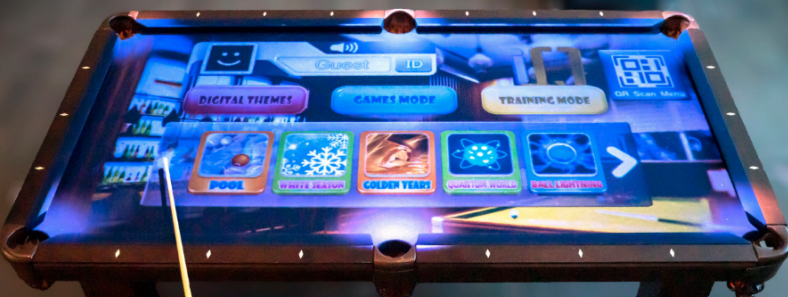
Choose from (3) Gaming Modes
Gently Place or Hover the Cue Stick on the table to select the Mode you wish to
play:
- Digital Themes contains interactive backgrounds for standard gameplay.
- Games Mode contain timed speed pool games, 1v1, a Drinking Game and more.
- Training Mode provides various novice to advance training modules for selfpace practice.
Start Up
Please select “Enter as Guest” or “Scan QR Code” via the IQ App.
Enter as Guest – Allows you to access and play the game immediately
Scan QR Code – By downloading the IQ Billiards App on iOS or Android platforms allows you to Scan the QR code and control the system with your phone, track your statistics on games and IQ Test Training Mode, Loyalty Rewards and much more.

Download this PDF (IQ-Billiards-Gameplay-Instructions.pdf) for more information.